Adressen-Problem

Summary / Zusammenfassung

Der Anrufer meldet einen Einsatz an einer Adresse in einer Gemeinde, bei Eingabe der Hausnummer springt der Einsatzort allerdings auf einen Ort etw 50 KM entfernt.

Steps to Reproduce / Schritte zur Reproduktion

  1. Session in Leitstelle Luxemburg starten
  2. Einsatz öffnen
  3. Adresse “Om Bombaasch, (5684 REMICH, Dalheim)” suchen
  4. Hausnummer 33 eingeben und kucken was passiert

Expected Behavior / Erwartetes Verhalten

Selbsterklärend

Actual Behavior / Tatsächliches Verhalten

Falsche Adressen und Koordinaten bei Eingabe der Hausnummer, Abweichung von AML-Daten, EO nicht auffindbar

Impact on Usage / Auswirkung auf die Nutzung

Minor: Small / cosmetic impact. / Kleiner / kosmetischer Einfluss.
X Moderate: It disrupts some workflows. / Beeinträchtigt einige Arbeitsabläufe.
Critical: I can’t use the platform at all. / Die Plattform ist nicht nutzbar.

Screenshots or Logs / Screenshots oder Protokolle

Die Auflösung der Koordinaten kann nie zu 100% zuverlässig erfolgen. Eine Behebung seitens der Entwickler im Sinne eines Tickets ist nicht notwendig.

In diesem Fall bitte im GIS Fenster den Einsatz anzeigen lassen und über den entsprechenden Button dort Koordinaten korrigieren und auf die korrekte Auflösung anpassen.

Anschließend merkt sich die Simulation den zugehörigen Standort, so dass künftige Einsätze zu dieser Adresse an diesem Punkt angelegt werden.

@jastamm Weißt du wie die “Mechanik” dahinter aussieht? Wenn der Einsatzort im GIS falsch aufgelöst wird, ist das das eine aber ich habe bis heute noch nicht ganz verstanden, wann ein Fahrzeug den Einsatzort findet und wann nicht.

Update: needs-attention

:united_states: The team is reviewing the issue based on provided information and will prioritize it next.
:germany: Das Team prüft das Problem anhand der Angaben und wird es anschließend priorisieren.

The simulation selects a random address ID during event generation under certain parameters. These are the same address data that are also available via the API or selection fields, for example in the deployment mask or administration area. This is therefore a shared address data pool.

The address data is structured (country, state, district, etc.), but not georeferenced, meaning without stored latitude and longitude values. When an address is needed on the map, the coordinates are only resolved at that moment via an external interface. This works without problems in most cases.

When coordinate resolution fails

If resolution fails, the generated event lands at incorrect coordinates, as seen in the screenshots from @ibuprofönix. This doesn’t only affect the map display: the simulation mechanics also receive incorrect coordinates, so the event may end up several (hundred) kilometers away from the actual deployment location.

Now the rescue resource must be considered: it doesn’t know which simulated event you want it to have. It behaves as it would in reality. The dispatch center alerts it with an address, and it drives there. Upon arrival, it searches for the event. However, if the event was generated with incorrect coordinates, the rescue resource finds nothing at the destination (“spawned incorrectly on the map”).

Correcting coordinates retroactively

Using the “Change coordinates” function, multiple interfaces are queried for the coordinates of the address in question. The correct coordinate can then be selected manually. This selection is permanently linked to the address. All future queries for this address, including in the simulation background, will use the selected coordinates from then on.

This also makes it possible to correct an event that was already incorrectly located retroactively: if the coordinates of the address are updated, the ongoing simulated event also refers to the new location.

Important: The correction only takes effect if the address matches exactly. If the event was generated for “Bahnhofstraße 3” but the coordinates were changed for “Bahnhofstraße” or “Bahnhofstraße 30”, there is no connection. The event then remains at the wrong location, and while the rescue resource may drive to the newly selected address, it will find no event in the vicinity.
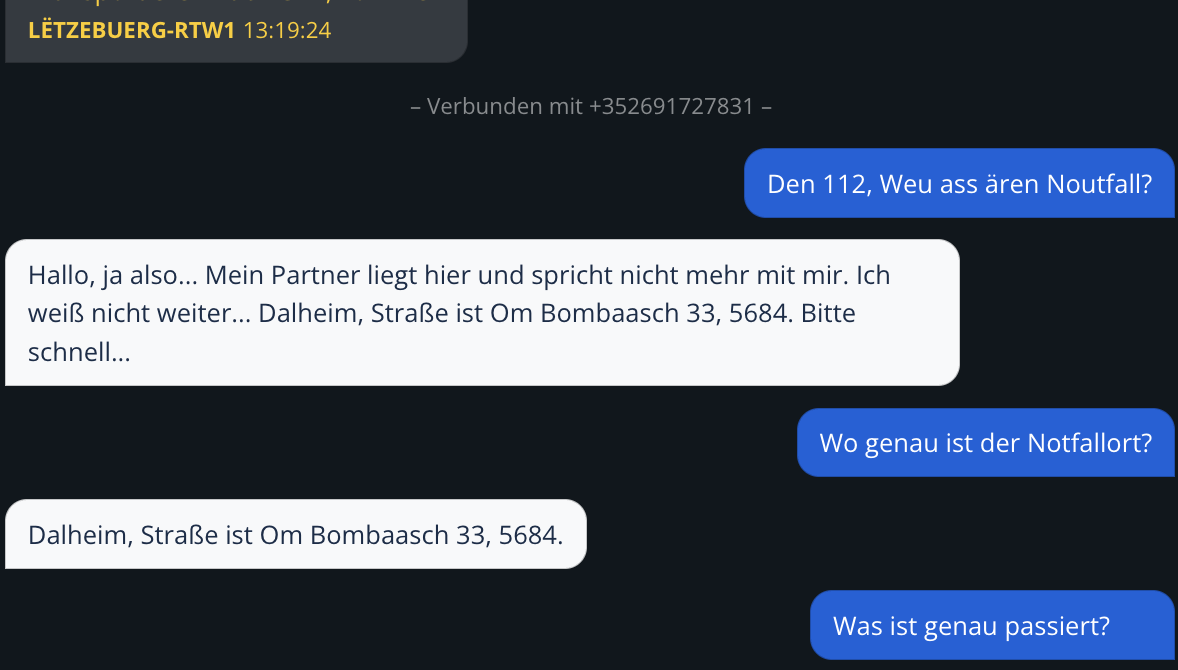
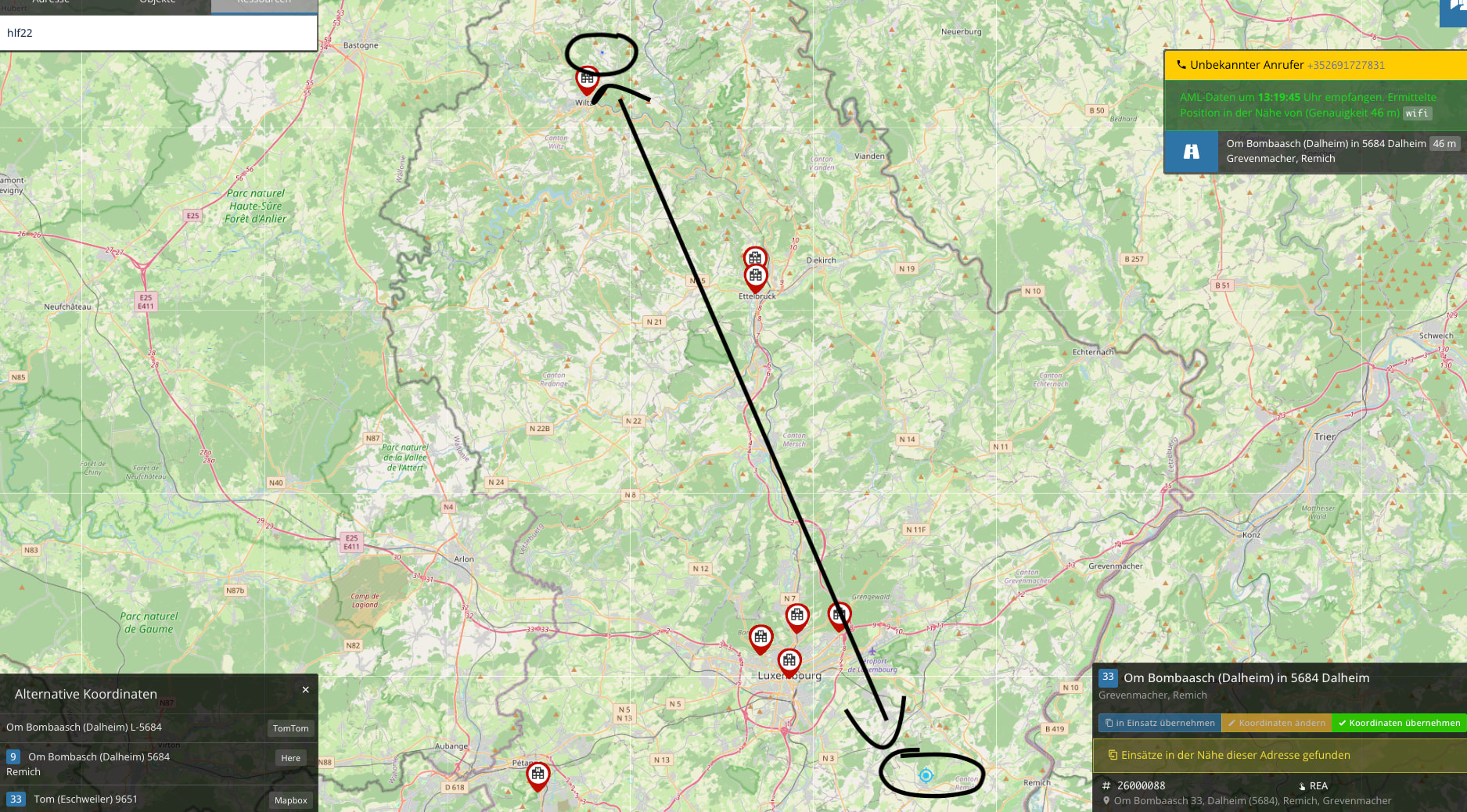
1 Like

Thanks. But what I still don’t understand is what the role of house numbers plays. From what I know, each street has its own address ID. What happens if the street is correct but the house number is wrong? Or to put it differently: The emergency call dialog generates a house number that may not exist on the map or in reality. How is it then decided whether the deployment will be found?

1 Like

From what I observe, SIM Dispatcher always searches for the closest matching address.

In the case of an incorrect house number, this can in the best case be the nearest house number or street center, but in some cases the resolution occurs at the town center or in foreign administrative districts. In the latter two cases, the corresponding correction must then be made.

Best regards

1 Like

The house number is a purely random numerical value. The correction must therefore be made if the house number does not exist and the deployment therefore goes nowhere.

Most recently, the search radius was increased from 50 to 100 meters. This also affects POIs: if, for example, the coordinates of a lake or body of water are set centrally in the middle, the rescue vehicle logically cannot reach this point. If the distance between the POI coordinates and the nearest accessible road segment is over 100 meters, the rescue vehicle will find nothing upon arrival.

I need to ask more specifically: If the caller provides a house number that doesn’t exist, where is the “correct” deployment then? What needs to be corrected?

The deployment takes place at the position that is displayed on the map when

  • exactly the reported address is entered in the deployment form and
  • the button is clicked to display the deployment location on the map.

Normally, you only need to pay attention to the exact spelling of the report when entering it in the deployment form - including the house number, even if it does not exist. The coordinate correction then moves the deployment location to the selected position so that it does not end up in the middle of nowhere. It is acceptable if the location is still not exactly correct, as long as the emergency services can reach it and thus find the deployment location.

1 Like

Today I had another interesting experience: The deployment address was an isolated farmstead that only has house number 1, but according to the caller, the deployment was at house number 30. Initially, an incorrect location was entered on the map outside the dispatch center’s area. This was noticed and manually corrected to the right road (= isolated farmstead). However, house number 30 was created somewhere outside this property and therefore couldn’t be found. Only after correcting it to house number 1 was the deployment location found.

Now I’m still wondering: How is the dispatcher supposed to know where exactly the “real” deployment is? In the example above, it was simple in retrospect because there was only a single house number. However, I still don’t understand how to find this needle in a haystack in densely populated areas.

And further on, I’m wondering: How can it be that the caller gives a house number 30 at all when it obviously doesn’t exist in any database? Surely a reality check should take place at this point already.